4.06.
http://www.acroname.com/robotics/parts/R48-IR12.html
I look forward to adding this to my Arduino collection: I want my project to be able to react to proximity of passers-by.
4.07
If I am going to make something interactive that can respond to more than one form of stimulus, the venus flytrap is an excellent case study. It responds to not only environmental conditions- humidity, sunlight, rainfall, and temperature- but also movement and touch.
4.08
RGB LED changing (rainbow) colors, Arduino from Meinaart van Straalen on Vimeo.
While waiting for my proximity sensor to arrive, I'm trying to come up with a few variables to be controlled by distance data. My arduino board came with a few different colors of LED's; color coding with light someone's distance from the sensor could be fun.
4.09
I really appreciate the look of the digital fabrication group's laser cut plexi... I purchased some clear acrylic today to create my creature. Under-lit plexi from Arduino's LED's should look vibrant.
Wednesday, April 6, 2011

Mistry Pravnav Talk
While it seems this technology is still years away, it certainly seems promising. There isn't anyone who would rather enjoy working on their "computer" wherever they please, as they go throughout the day. No one wants to be a slave to their computer monitor. This would also be fantastic in eliminating the waste in the production of computer screens, which inevitably become outdated every five years or so.
Monday, April 4, 2011
individual project. progress update
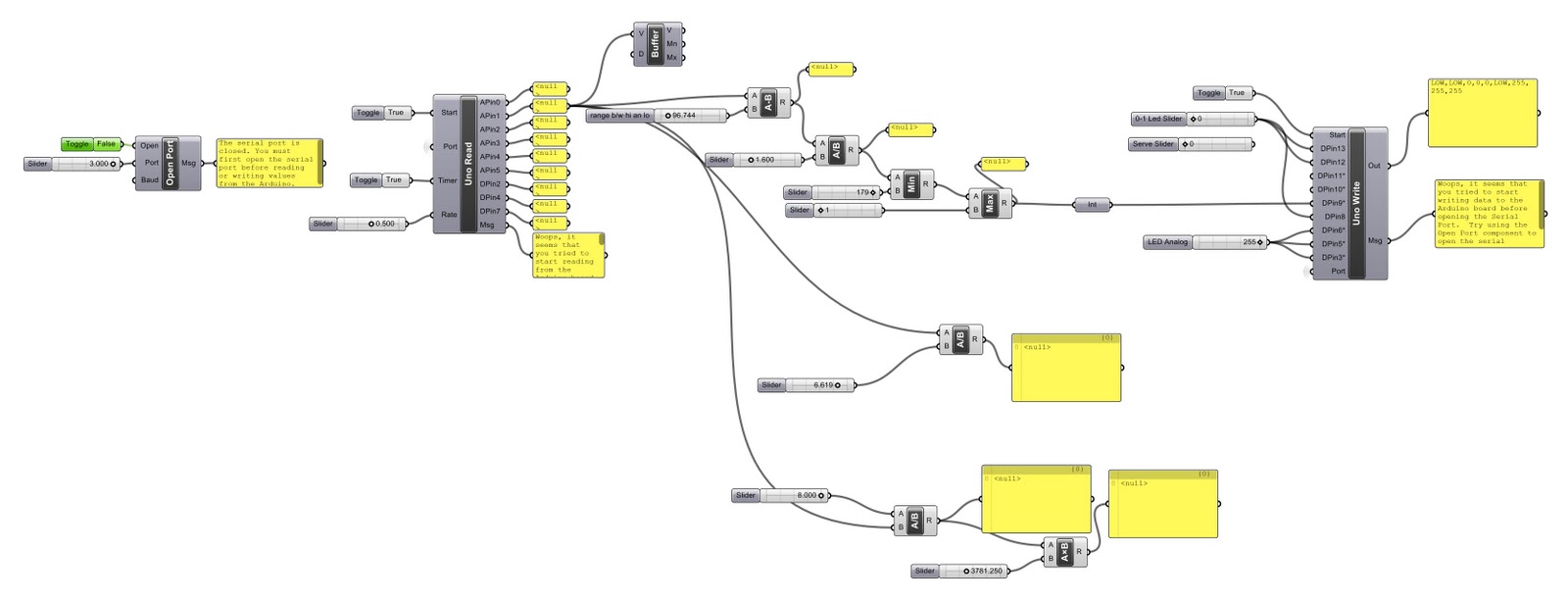
Now that I have proven to myself that I can control Arduino, I need to find an application for it. While originally I was looking to create a digital flower that responds to light, I want to find something that is less predictable and responsive to more criteria. The script above allows a servo motor to respond to the fluctuating light levels in a room, but I want to branch out and try out some sensors that respond to proximity, touch, noise and temperature. In class we discussed the possibilities of interacting with something digital, and I now want to create something that unless uninterrupted, will do its own thing- as if it weren't simply created to cater to the user.
Here are some great examples of work with Arduino and proximity sensors:
http://natebu.wordpress.com/
Sunday, April 3, 2011
case studies
Tuesday, March 22, 2011
project. interactive architecture
Firefly for Grasshopper / Arduino from Jason K Johnson on Vimeo.
I am expecting an Arduino board in the mail tomorrow. I am excited to try my hand with it via Firefly, an add on to Grasshopper. I also ordered a light sensor and a rotation motor, and I hope to be able to control the motor with the data from the light sensor, similar to this example of a light data being used to control aperture sizes in grasshopper geometry.
Arduino + Grasshopper & Firefly from Rodrigo Medina on Vimeo.
Whereas in the video above, physical data is used to manipulate arbitrary digital geometry, I would like to instead have physical data manipulate a physical object. Ultimately, I want to build a sort of digitally controlled "flower," perhaps a homage to Phillip Beasley, that reacts to light by opening and closing its petals based on the amount of light the flower receives. Below is an example of a physical armature being controlled by physical data via the movements of a wii remote.
Robofun with Arduino, Grasshopper, FireFly from Chris Wilkins on Vimeo.
Monday, February 28, 2011
invisible landscapes
take a look at this... a very interesting project that beautifully illustrates the spirit of connective digital networks.
Sunday, February 27, 2011
digital recycling
Since I chose to develop a perspective of one of my projects in my portfolio, I found it a bit difficult to break away from my work process I typically use in renderings. Although I have a great appreciation for hand renderings, I typically shy away from drawing things by hand for presentation purposes, as I find photoshop to be more efficient and forgiving. That being said, there is a certain character indicative of a hand drawing that rarely is evident in a clean, polished digital rendering; for the digital recycling project, I wanted to create a process that would capture a certain roughness that is found in a hand rendering.
I began with a digitally rendered section of my project, and printed it out without altering it in anyway. I wanted to soften the ground plane and fade it out towards the edges of the composition, so I cut out digitally rendered ground and just did some smearing of graphite to fill in the ground.

 I then scanned the image in gray scale, as I found the values to be more exciting in the image when they weren't competing with the blue tint of the digital rendering. Since the image is now entirely desaturated, in photoshop I brought some color back by adding some foliage. After printing again, I realized I needed to poche the section cuts and ground plane to allow for the rendering to read as a section.

 In illustrator I cleaned up the line work and found that I preferred a yellow poche over my sharpie's light blue. I had some crinkeled trace paper on my desk, and wanted to give the sky some texture, so I scanned in my sheet of wrinkled trace and overlayed it on top of the rendering. As I stretched the s smaller scanned image over top of the larger perspective, it took on a subtly noisy and pixelated appearance, which I found added another layer of texture to the image.

 I then layered in some background trees and sky from some photographs I took at the site prior to construction. Finally, in order to give the image some life and a human scale, I found in a newspaper two figures that I scanned in and dropped into the final composition.

 I found a point of diminishing return rather quickly, as although I feel that each step added something to the overall character of the composition, in the end I would be satisfied with any of the images after the third piece. The most successful of the iterations was the texture added by the trace paper in the sky; this is a method I will probably use in the future. It also would be interesting to apply this technique to the ground as well to create an appealing texture.
I began with a digitally rendered section of my project, and printed it out without altering it in anyway. I wanted to soften the ground plane and fade it out towards the edges of the composition, so I cut out digitally rendered ground and just did some smearing of graphite to fill in the ground.


Subscribe to:
Posts (Atom)